
Toggl command line on Windows
-
Make a directory for user binaries:
Terminal window mkdir -p ~/bin -
…and change to it:
Terminal window cd ~/bin -
Clone the repository into the subdirectory “toggl-cli”:
Terminal window git clone https://github.com/drobertadams/toggl-cli.git -
Install prerequisites (“requests” was not mentioned in the README, but did need to be installed on my system with ActiveState Python 2.7):
pip install iso8601 pytz requests -
Run the program once, don’t be afraid when it crashes, this is expected because of the missing configuration file (which it creates during this run):
Terminal window python ~/bin/toggl-cli/toggl.py -
Edit the configuration file:
Terminal window vim ~/.togglrc -
Update the line “username” with the “E-mail” and the line “apitoken” with the API token from your Toggl profile, e.g.:
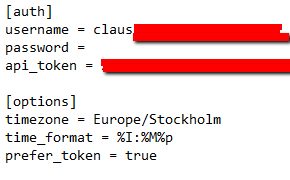
-
Save and close the configuration file.
toggl-cli is now ready for use (you might want to add it to your PATH and change the shebang line to your Python interpreter for ease of use). Some usage examples:
-
Start working on a task:
Terminal window python ~/bin/toggl-cli/toggl.py start Blogging -
Stop working on a task:
Terminal window python ~/bin/toggl-cli/toggl.py stop -
Continue working on a task:
Terminal window python ~/bin/toggl-cli/toggl.py continue Blogging -
View more advanced syntax examples:
Terminal window python ~/bin/toggl-cli/toggl.py -h